
ACD Reporting turns your call queue data into clear, actionable intelligence — giving supervisors real-time wallboards, agents a live performance view, and management the historical reports they need to make confident staffing decisions.
ACD Reporting is the contact center intelligence module within CAS-ia. It captures queue activity as it happens, surfaces it on live wallboards, and archives it for historical analysis — giving every level of your team the view they need to perform.
No manual data entry. Queue stats flow in automatically from your phone system's ACD output.
Wallboards on any screen. Display live queue status on TVs, monitors, or agent desktops — no special hardware.
Multi-queue ready. Monitor all your ACD paths simultaneously with per-queue thresholds and alerts.
Historical depth. Drill into trends by day, week, or month — and export data for payroll or performance reviews.
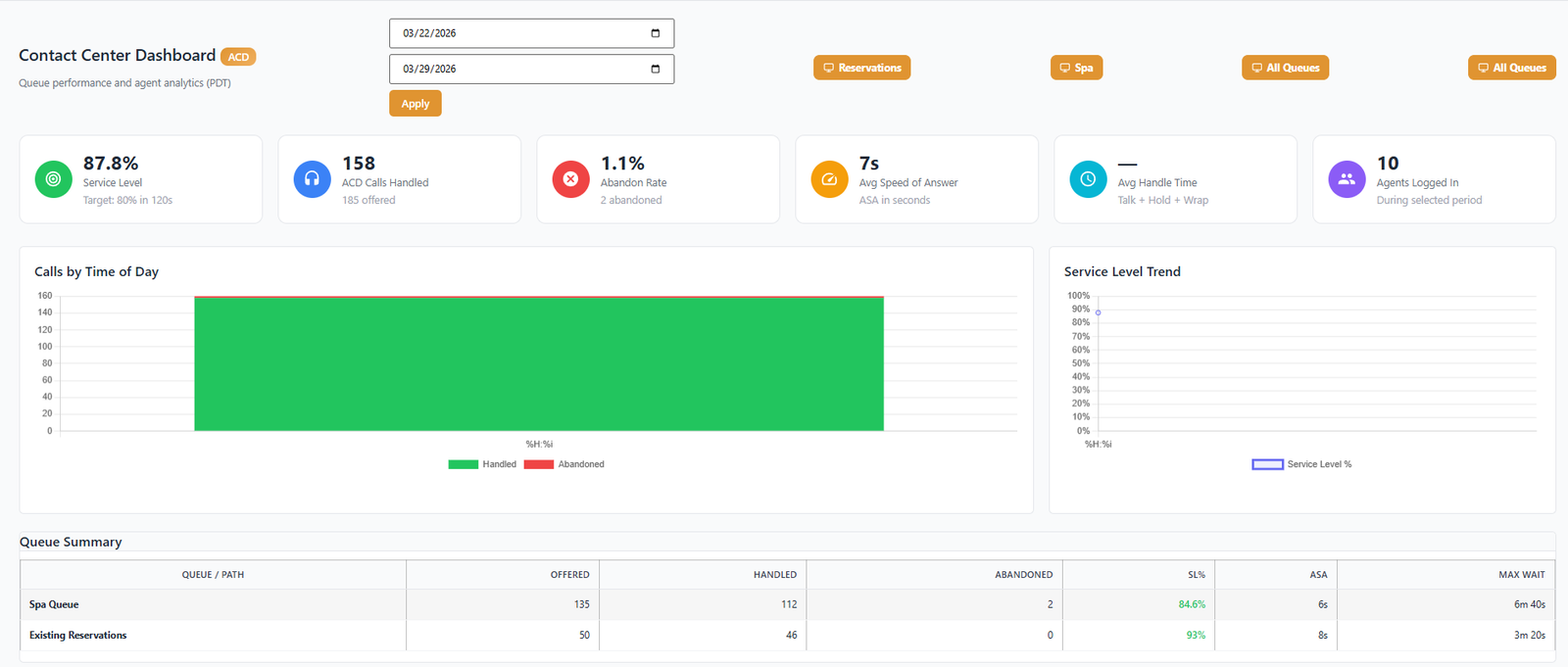
From the live wallboard your agents glance at all day to the monthly trend report your manager presents in reviews — ACD Reporting covers the full operational picture.
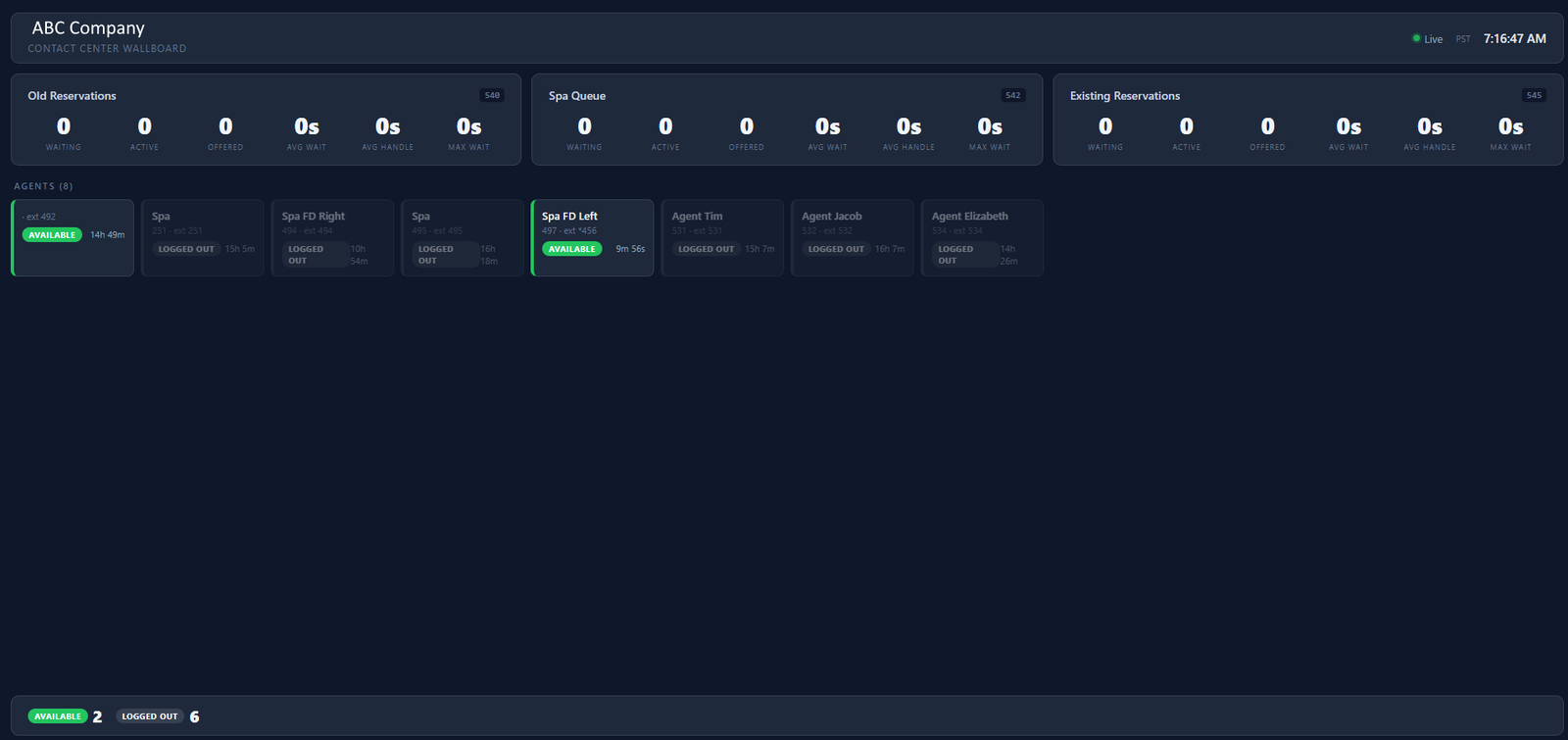
A real-time display showing calls waiting, longest wait time, agents available, and current SLA performance — refreshed continuously and visible on any screen or browser.
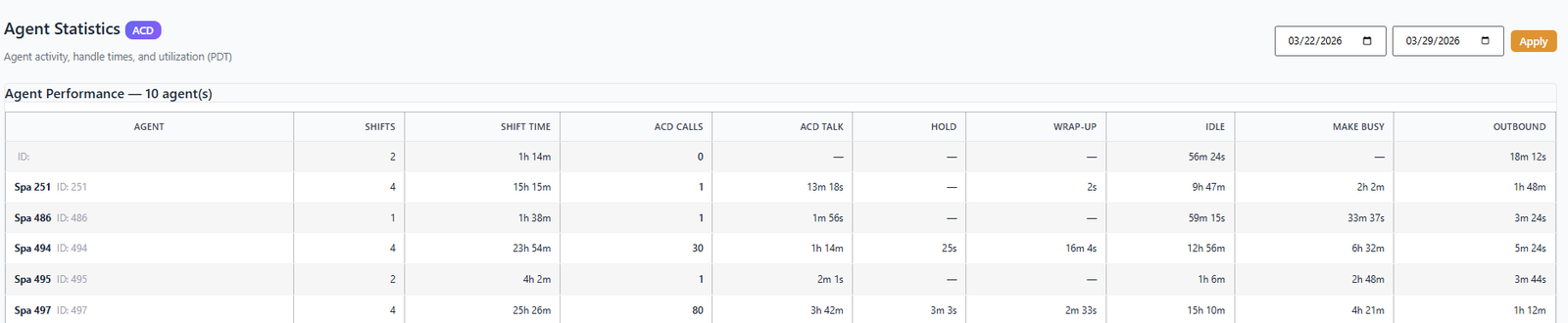
Track calls handled, average handle time, talk time, and availability by agent — for both real-time supervision and historical review periods.
Define service level thresholds per queue and monitor compliance in real time. Visual indicators change color when SLA is at risk — before it becomes a breach.
See exactly how many calls were abandoned, at what point in the queue, and during which time windows — critical data for right-sizing your coverage model.
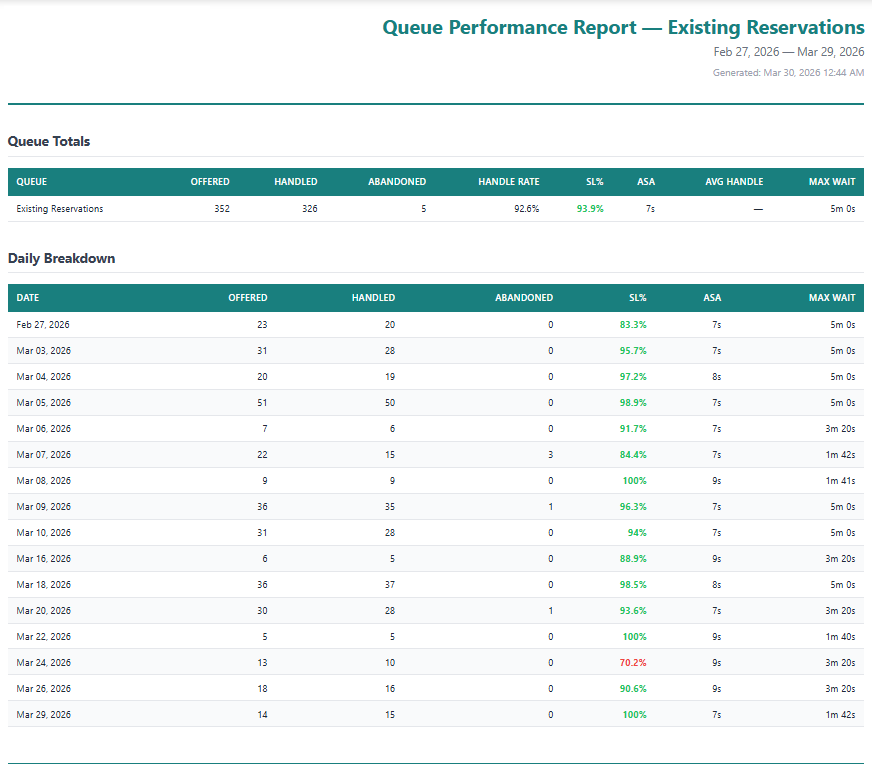
Date-range reports covering call volume, handle times, SLA compliance, abandon rates, and agent productivity — exportable and filterable by queue, agent, and time period.
Monitor all ACD paths simultaneously. Each queue displays independently with its own metrics, thresholds, and wallboard card — even when paths share agents.
Break down queue activity into 15- or 30-minute intervals — perfect for identifying peak periods, planning shift coverage, and validating staffing models.
Automate daily, weekly, or monthly report emails to supervisors, managers, or clients — keeping stakeholders informed without anyone having to log in and pull data manually.
Automatically resolves inconsistent path identifiers from your phone system — so your reports stay clean even when the PBX uses different naming conventions across configurations.
The CAS-ia ACD wallboard is designed for the pace of a live contact center. Supervisors see everything at once — every queue, every agent status, every SLA threshold — on a single, auto-refreshing display that runs in any browser.
Give agents a personal performance view — not just the wall display. Each agent can see their own call counts, talk time, and handle time for the current shift, keeping them self-aware and motivated without requiring supervisor intervention.
Go beyond today's dashboard. CAS-ia ACD stores your queue history and surfaces it through flexible reports that answer the questions managers actually ask — staffing gaps, peak periods, SLA compliance over time, and individual agent trends.
Interval reporting breaks your queue data into 15- or 30-minute blocks, revealing the precise peaks and valleys in your call volume. Stop guessing when to staff up — let the data show you.
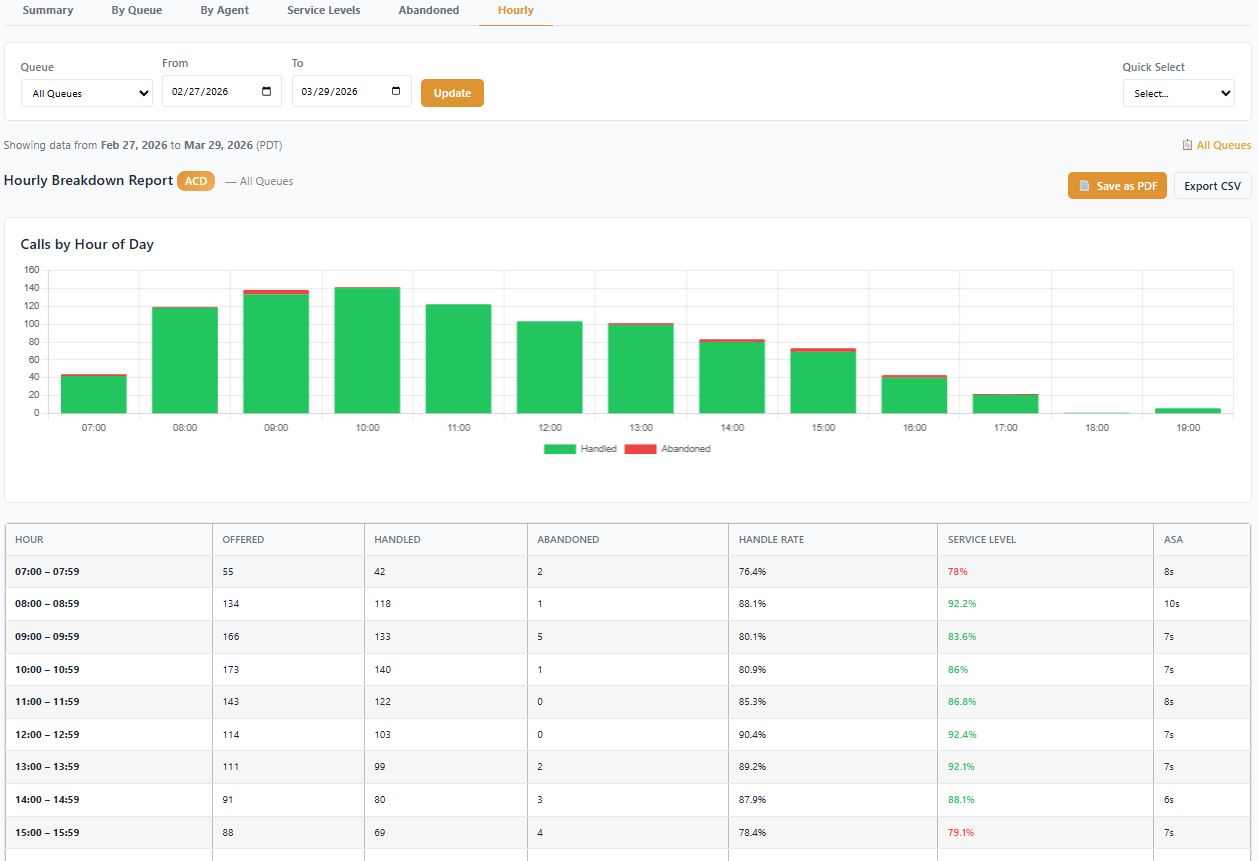
CAS-ia ACD captures and surfaces the full set of contact center KPIs — live and historically — so nothing falls through the cracks.
ACD Reporting has three independent role tiers — completely separate from GSE or Call Accounting roles. A user can be an ACD Supervisor while holding a different role elsewhere on the platform.
Permissions are additive and never conflicting across CAS-ia modules. Each product's role is assigned independently, so your supervisors, agents, and executives all see exactly what they need — nothing more, nothing less.
CAS-ia connects to your ACD data feed and starts reporting immediately — no lengthy setup, no custom programming.
The CAS-ia Collector receives your phone system's ACD data feed and normalizes queue paths automatically.
Set up your queue names, SLA thresholds, wallboard layout, and user roles from the admin portal.
Open the wallboard on any screen. Supervisors and agents see live metrics immediately — no installation needed.
Run historical reports, schedule automated delivery, and export data to inform staffing, coaching, and planning.
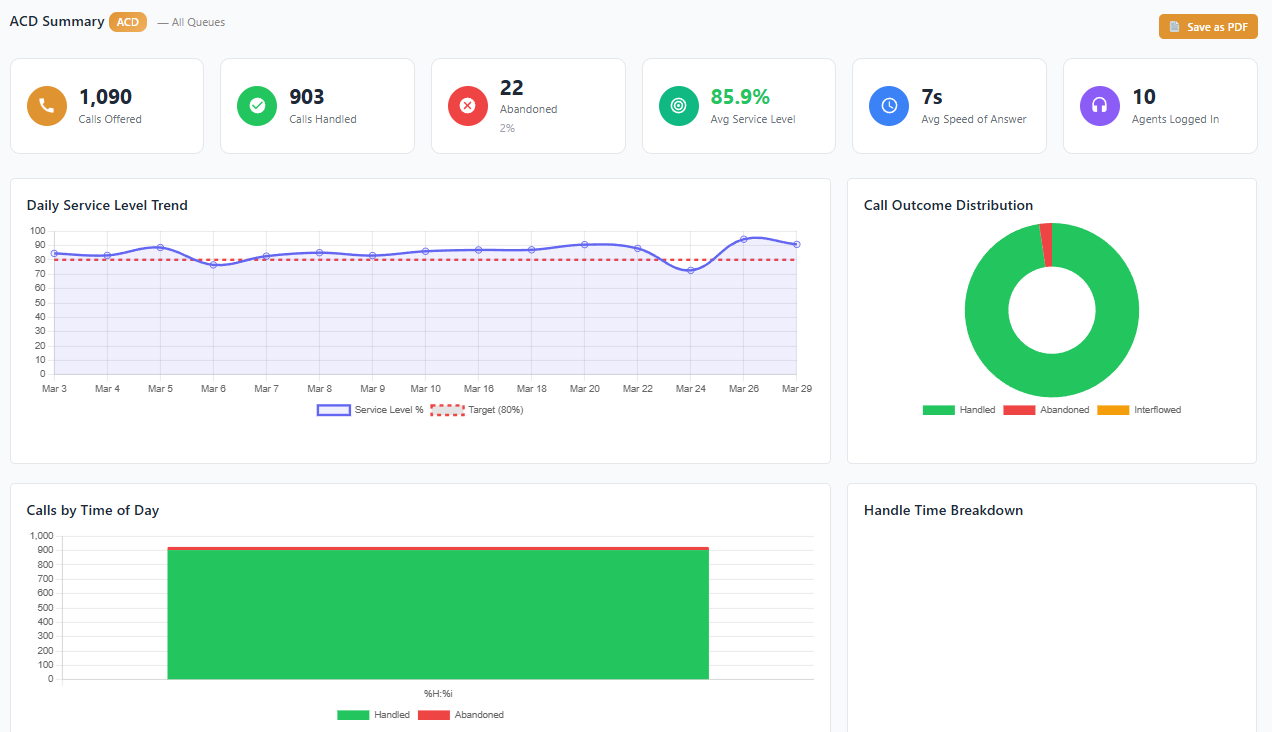
Schedule a live walkthrough with your CAS-ia representative to see how ACD Reporting can be configured for your contact center today.
